Data Visualization
A picture is worth a thousand words. In machine learning, we usually handle high-dimensional data, which is impossible to draw on display directly. But a variety of statistical plots are tremendously valuable for us to grasp the characteristics of many data points. SMILE provides data visualization tools such as plots and maps for researchers to understand information more easily and quickly.
Scatter Plot
A scatter plot displays data as a collection of points. Points can be color-coded by class label, which is useful for classification tasks.
Use ScatterPlot (Scala: plot) with a mark character and optional class labels for color coding.
The legends are as follows.
-
.: dot -
+: + -
-: - -
|: | -
*: star -
x: x -
o: circle -
O: large circle -
@: solid circle -
#: large solid circle -
s: square -
S: large square -
q: solid square -
Q: large solid square
For any other char, the data point will be drawn as a dot.
In Java, plot factories return a shape (for example ScatterPlot)
whose figure() builds a Figure.
Call figure.show() (or wrap the figure in
FigurePane)
to open a desktop window. Scala helpers such as plot return a
Canvas; display it with show(canvas) from
smile.plot. Right-click the window for print, title, and axis options.
For both 2D and 3D plots, zoom with the mouse wheel. For 2D plots, double-click then drag to pan, or drag a rectangle to zoom into a region. For 3D plots, drag to rotate the view.
    import smile.io.Read;
    import smile.plot.swing.ScatterPlot;

    var iris = Read.arff("data/weka/iris.arff");
    var figure = ScatterPlot.of(iris, "sepallength", "sepalwidth", "class", '*').figure();
    figure.setAxisLabels("sepallength", "sepalwidth");
    figure.show();
    val iris = read.arff("data/weka/iris.arff")
    val canvas = plot(iris, "sepallength", "sepalwidth", "class", '*')
    canvas.figure().setAxisLabels("sepallength", "sepalwidth")
    show(canvas)
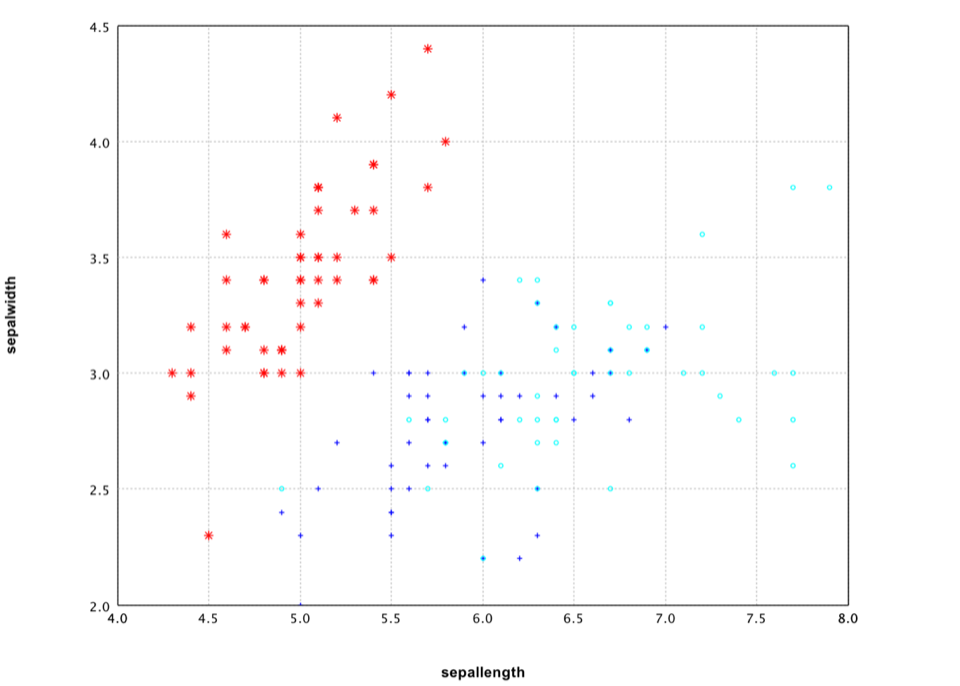
In this example, we plot the first two columns of Iris data. We use the class label for legend and color coding.
It is also easy to draw a 3D plot.
    var figure = ScatterPlot.of(iris, "sepallength", "sepalwidth", "petallength", "class", '*').figure();
    figure.setAxisLabels("sepallength", "sepalwidth", "petallength");
    figure.show();
    val canvas = plot(iris, "sepallength", "sepalwidth", "petallength", "class", '*')
    canvas.figure().setAxisLabels("sepallength", "sepalwidth", "petallength")
    show(canvas)
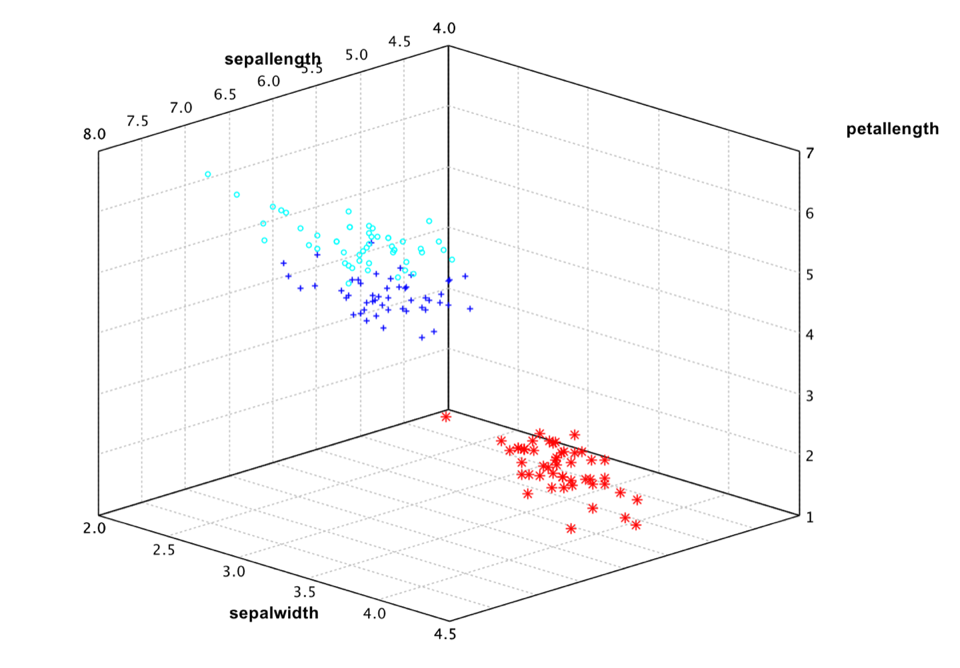
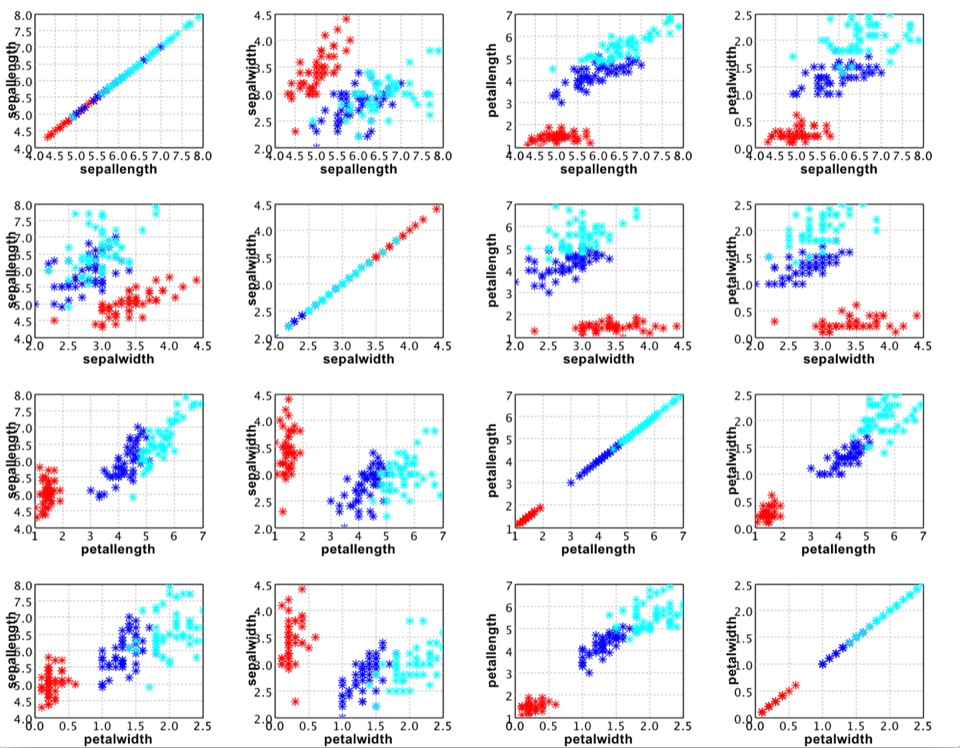
However, the Iris data has four attributes. So even 3D plot is not sufficient to see the whole picture. A general practice is plot all the attribute pairs. For example,
    var pane = MultiFigurePane.splom(iris, '*', "class");
    pane.window();
show(splom(iris, '*', "class"))
Line Chart
A line chart connects points by straight lines.
Use LinePlot (Scala: line) to connect points with a stroke style and color.
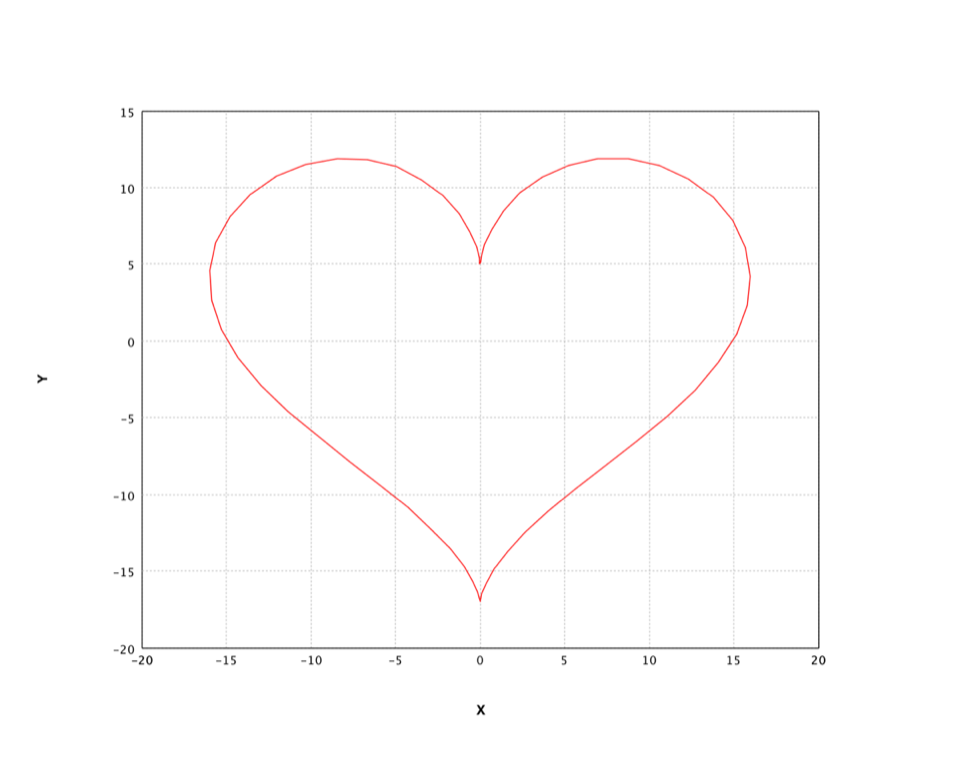
Let's draw a heart with it!
    import java.awt.Color;
    import smile.plot.swing.LinePlot;
    import static java.lang.Math.*;

    double[][] heart = new double[200][2];
    for (int i = 0; i < 200; i++) {
        double t = PI * (i - 100) / 100;
        heart[i][0] = 16 * pow(sin(t), 3);
        heart[i][1] = 13 * cos(t) - 5 * cos(2*t) - 2 * cos(3*t) - cos(4*t);
    }
    var figure = LinePlot.of(heart, Color.RED).figure();
    figure.show();
    val heart = -314 to 314 map { i =>
      val t = i / 100.0
      val x = 16 * pow(sin(t), 3)
      val y = 13 * cos(t) - 5 * cos(2*t) - 2 * cos(3*t) - cos(4*t)
      Array(x, y)
    }
    show(line(heart.toArray, color = RED))
Box Plot
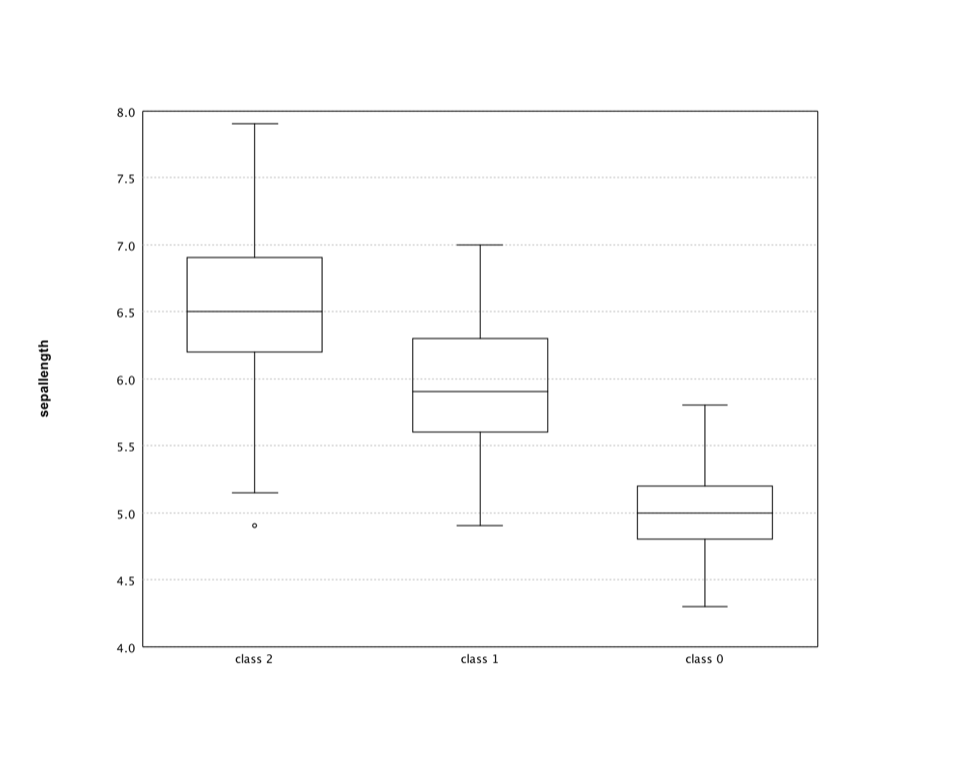
The box plot is a standardized way of displaying the distribution of data based on the five number summary: minimum, first quartile, median, third quartile, and maximum.
Box plots can be useful to display differences between populations without making any assumptions of the underlying statistical distribution: they are non-parametric. The spacings between the different parts of the box help indicate the degree of dispersion (spread) and skewness in the data, and identify outliers.
Use BoxPlot (Scala: boxplot). Each row of the data matrix becomes one box; optional labels name the groups.
Note that the parameter data is a matrix of which each row to
create a box plot.
    String[] labels = ((smile.data.measure.NominalScale) iris.schema().field("class").measure()).levels();
    double[][] data = new double[labels.length][];
    for (int i = 0; i < data.length; i++) {
        var label = labels[i];
        data[i] = iris.stream().
              filter(row -> row.getString("class").equals(label)).
              mapToDouble(row -> row.getFloat("sepallength")).
              toArray();
    }
    var figure = new BoxPlot(data, labels).figure();
    figure.setAxisLabels("", "sepallength");
    figure.show();
    val groups = (iris("sepallength").toDoubleArray zip iris("class").toStringArray).groupBy(_._2)
    val labels = groups.keys.toArray
    val data = groups.values.map { a => a.map(_._1) }.toArray
    val canvas = boxplot(data, labels)
    canvas.figure().setAxisLabels("", "sepallength")
    show(canvas)
Histogram
A histogram is a graphical representation of the distribution of numerical data. The range of values is divided into a series of consecutive, non-overlapping intervals/bins. The bins must be adjacent, and are usually equal size.
Use Histogram (Scala: hist),
which returns a BarPlot. Pass bin count k (default 10), or an array of bin
breakpoints, and whether to plot probabilities.
Let's apply the histogram to an interesting data: the wisdom of crowds. The original experiment took place about a hundred years ago at a county fair in England. The fair had a guess the weight of the ox contest. Francis Galton calculated the average of all guesses, which is right to within one pound.
Recently, NPR Planet Money ran the experiment again. NPR posted a couple of pictures of a cow (named Penelope) and asked people to guess her weight. They got over 17,000 responses. The average of guesses was 1,287 pounds, which is pretty close to Penelope's weight 1,355 pounds.
    var cow = Read.csv("data/stat/cow.txt").column("V1").toDoubleArray();
    var figure = Histogram.of(cow, 50, true).figure();
    figure.setAxisLabels("Weight", "Probability");
    figure.show();
    val cow = read.csv("data/stat/cow.txt", header=false)("V1").toDoubleArray
    val canvas = hist(cow, 50)
    canvas.figure().setAxisLabels("Weight", "Probability")
    show(canvas)
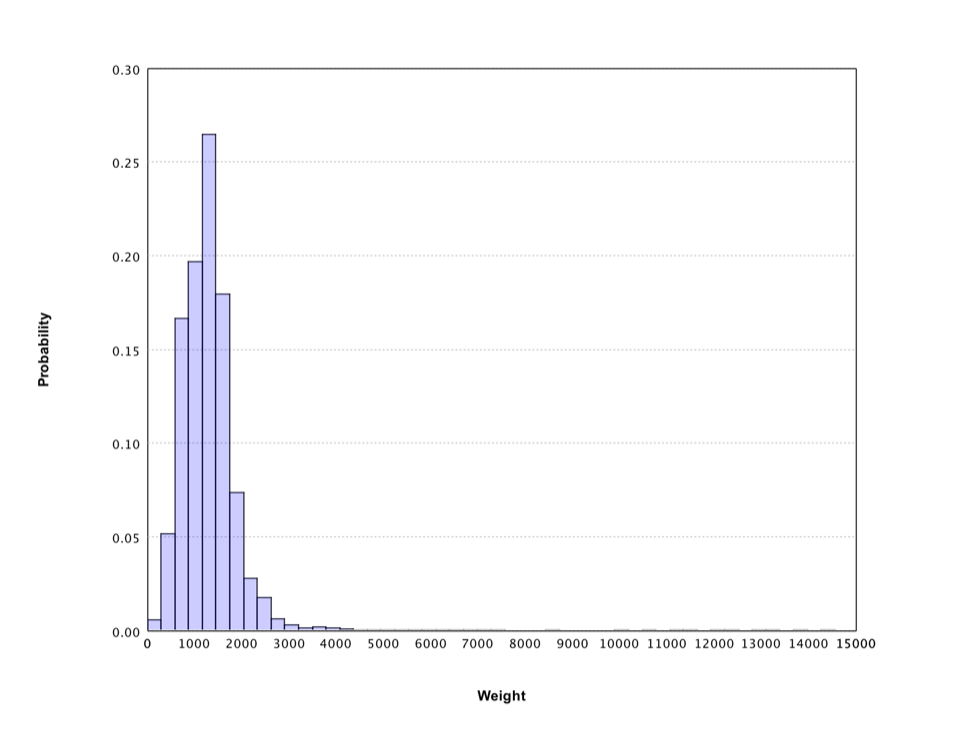
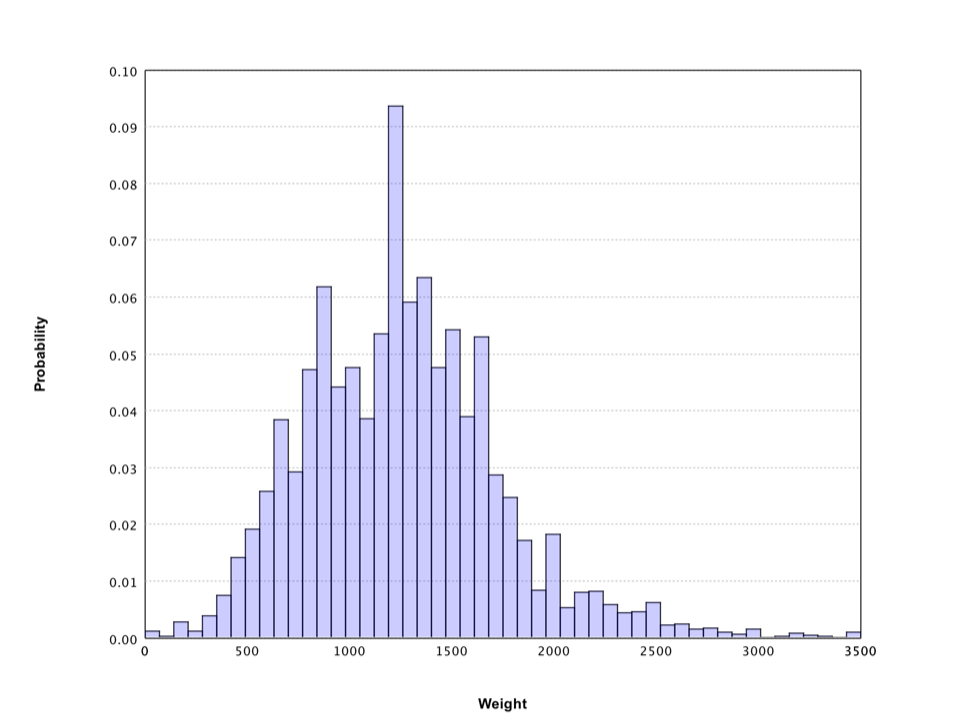
The histogram gives a rough sense of the distribution of crowd guess, which has a long tail. Filter out the weights over 3500 pounds, the histogram shows more details.
    var figure = Histogram.of(Arrays.stream(cow).filter(w -> w <= 3500).toArray(), 50, true).figure();
    figure.setAxisLabels("Weight", "Probability");
    figure.show();
    val canvas = hist(cow.filter(_ <= 3500), 50)
    canvas.figure().setAxisLabels("Weight", "Probability")
    show(canvas)
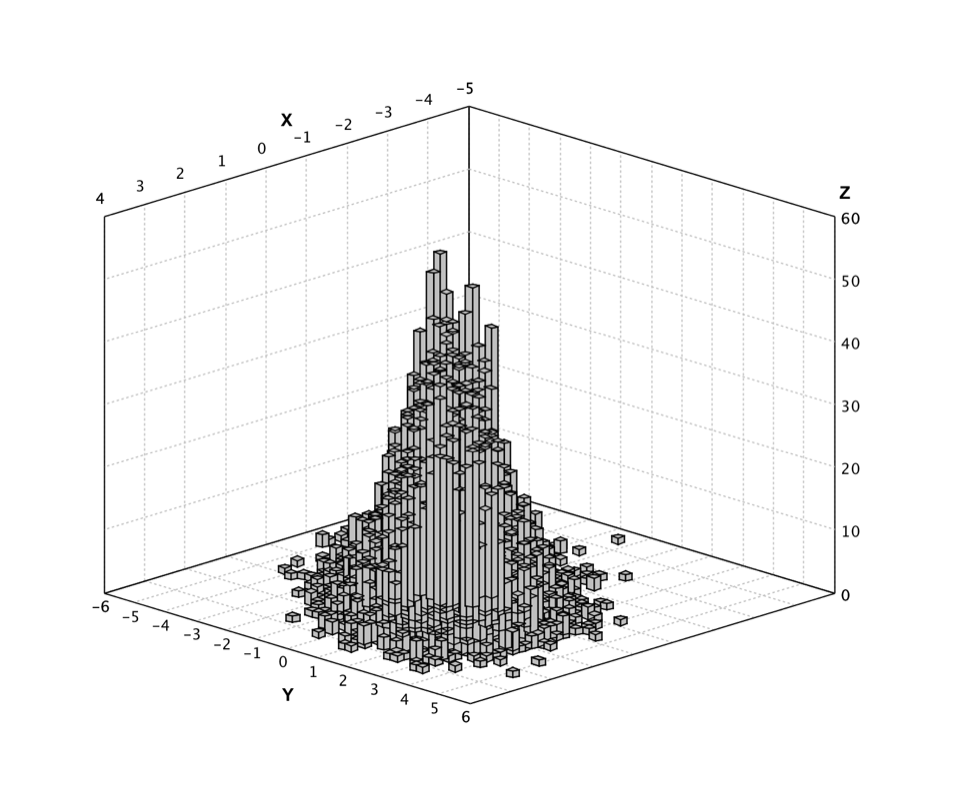
SMILE also supports histograms that display the distribution of 2-dimensional data.
Use Histogram3D (Scala: hist3) for bivariate distributions, with bin counts and an optional color palette.
Here we generate a data set from a 2-dimensional Gaussian distribution.
    import smile.plot.swing.Histogram3D;
    import smile.stat.distribution.MultivariateGaussianDistribution;
    import smile.tensor.DenseMatrix;
    import java.util.stream.Stream;

    double[] mu = {0.0, 0.0};
    double[][] v = { {1.0, 0.6}, {0.6, 2.0} };
    var gauss = new MultivariateGaussianDistribution(mu, DenseMatrix.of(v));
    var data = Stream.generate(gauss::rand).limit(10000).toArray(double[][]::new);
    var figure = Histogram3D.of(data, 50, false).figure();
    figure.show();
    val gauss = new MultivariateGaussianDistribution(Array(0.0, 0.0), DenseMatrix.of(Array(Array(1.0, 0.6), Array(0.6, 2.0))))
    val data = (0 until 10000) map { i: Int => gauss.rand }
    show(hist3(data.toArray, 50, 50))
The corresponding histogram looks like
Q-Q Plot
A Q–Q plot ("Q" stands for quantile) is a probability plot for comparing two probability distributions by plotting their quantiles against each other. A point (x, y) on the plot corresponds to one of the quantiles of the second distribution (y-coordinate) plotted against the same quantile of the first distribution (x-coordinate).
Use QQPlot (Scala: qqplot) to compare a sample to a reference distribution (default: standard Gaussian) or to another sample.
SMILE supports the Q-Q plot of samples to a given distribution and also of two sample sets. The second distribution/samples is optional. If missing, we assume it the standard Gaussian distribution.
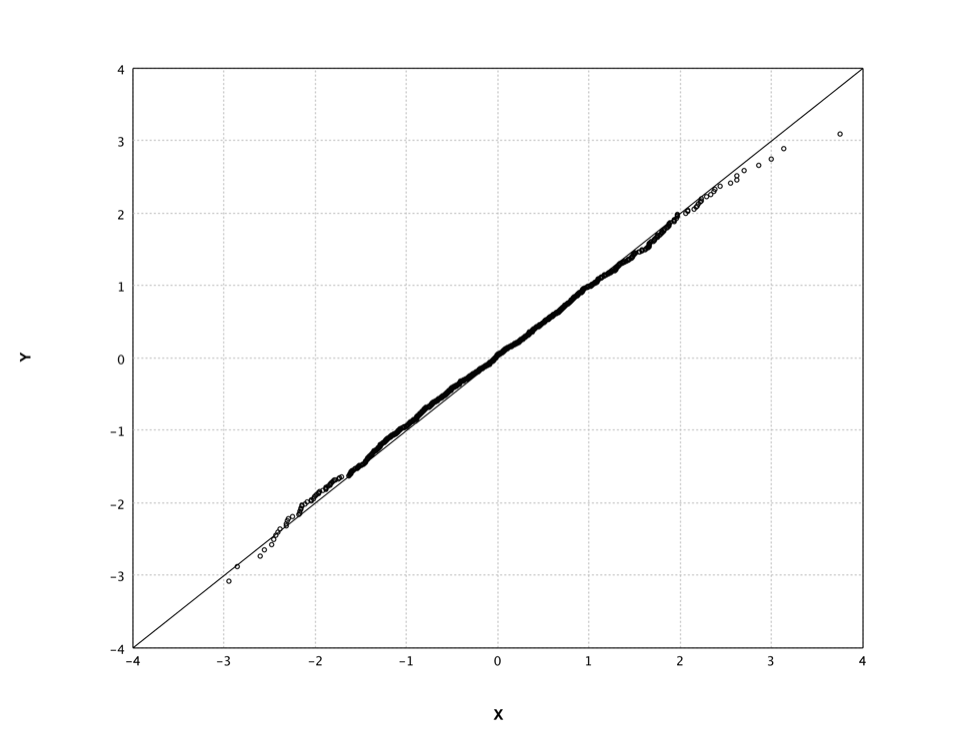
In what follows, we generate a random sample set from standard Gaussian distribution and draw its Q-Q plot.
    var gauss = new GaussianDistribution(0.0, 1.0);
    var data = DoubleStream.generate(gauss::rand).limit(1000).toArray();
    var figure = QQPlot.of(data).figure();
    figure.show();
    val gauss = new GaussianDistribution(0.0, 1.0)
    val data = (0 until 1000) map { i: Int => gauss.rand }
    show(qqplot(data.toArray))
In fact, this is also a good visual way to verify the quality of our random number generator.
Heatmap
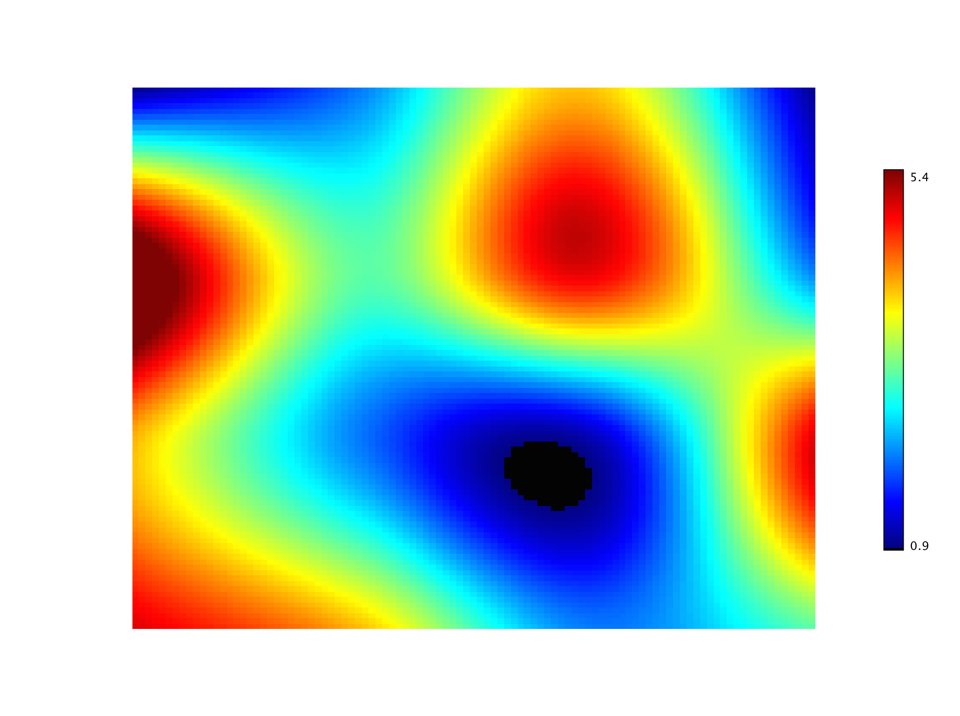
A heat map is a graphical representation of data where the values in a matrix are represented as colors. In cluster analysis, researchers often employs the heat map by permuting the rows and the columns of a matrix to place similar values near each other according to the clustering.
Use Heatmap (Scala: heatmap).
Provide the matrix z and either a palette or a color count k;
optional ascending x/y coordinates or row/column labels locate the cells.
In what follows, we display the heat map of a matrix. We start with a small 4 x 4 matrix and
enlarge it with bicubic interpolation. We also use the helper class Palette to generate the color
scheme. This class provides many other color schemes.
    import smile.interpolation.BicubicInterpolation;
    import smile.plot.swing.Heatmap;
    import smile.plot.swing.Palette;

    // the matrix to display
    double[][] z = {
      {1.0, 2.0, 4.0, 1.0},
      {6.0, 3.0, 5.0, 2.0},
      {4.0, 2.0, 1.0, 5.0},
      {5.0, 4.0, 2.0, 3.0}
    };

    // make the matrix larger with bicubic interpolation
    double[] x = {0.0, 1.0, 2.0, 3.0};
    double[] y = {0.0, 1.0, 2.0, 3.0};
    var bicubic = new BicubicInterpolation(x, y, z);
    var Z = new double[101][101];
    for (int i = 0; i <= 100; i++) {
      for (int j = 0; j <= 100; j++)
        Z[i][j] = bicubic.interpolate(i * 0.03, j * 0.03);
    }

    var figure = Heatmap.of(Z, Palette.jet(256)).figure();
    figure.show();
    // the matrix to display
    val z = Array(
      Array(1.0, 2.0, 4.0, 1.0),
      Array(6.0, 3.0, 5.0, 2.0),
      Array(4.0, 2.0, 1.0, 5.0),
      Array(5.0, 4.0, 2.0, 3.0)
    )

    // make the matrix larger with bicubic interpolation
    val x = Array(0.0, 1.0, 2.0, 3.0)
    val y = Array(0.0, 1.0, 2.0, 3.0)
    val bicubic = new BicubicInterpolation(x, y, z)
    val Z = Array.ofDim[Double](101, 101)
    for (i <- 0 to 100) {
      for (j <- 0 to 100)
        Z(i)(j) = bicubic.interpolate(i * 0.03, j * 0.03)
    }

    show(heatmap(Z, Palette.jet(256)))
Sparse Matrix Spy
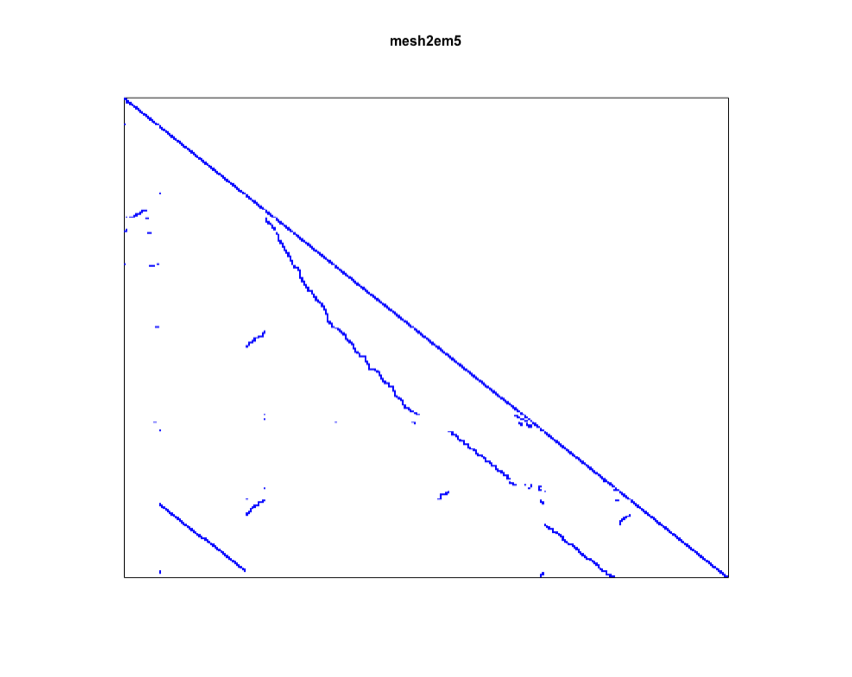
A special case of heat map is to draw the sparsity pattern of a matrix.
Use SparseMatrixPlot (Scala: spy) to draw the sparsity pattern of a SparseMatrix.
The structure of sparse matrix is critical in solving linear systems.
    import smile.plot.swing.SparseMatrixPlot;
    import smile.tensor.SparseMatrix;

    var sparse = SparseMatrix.text(java.nio.file.Paths.get("data/matrix/mesh2em5.txt"));
    var figure = SparseMatrixPlot.of(sparse).figure();
    figure.setTitle("mesh2em5");
    figure.show();
    val sparse = SparseMatrix.text(java.nio.file.Paths.get("data/matrix/mesh2em5.txt"))
    val canvas = spy(sparse)
    canvas.figure().setTitle("mesh2em5")
    show(canvas)
Hexmap
Another variant is the hex map where hexagon cells replace rectangle cells.
Use Hexmap (Scala: hexmap) for hexagonal cells—common for SOM U-matrices.
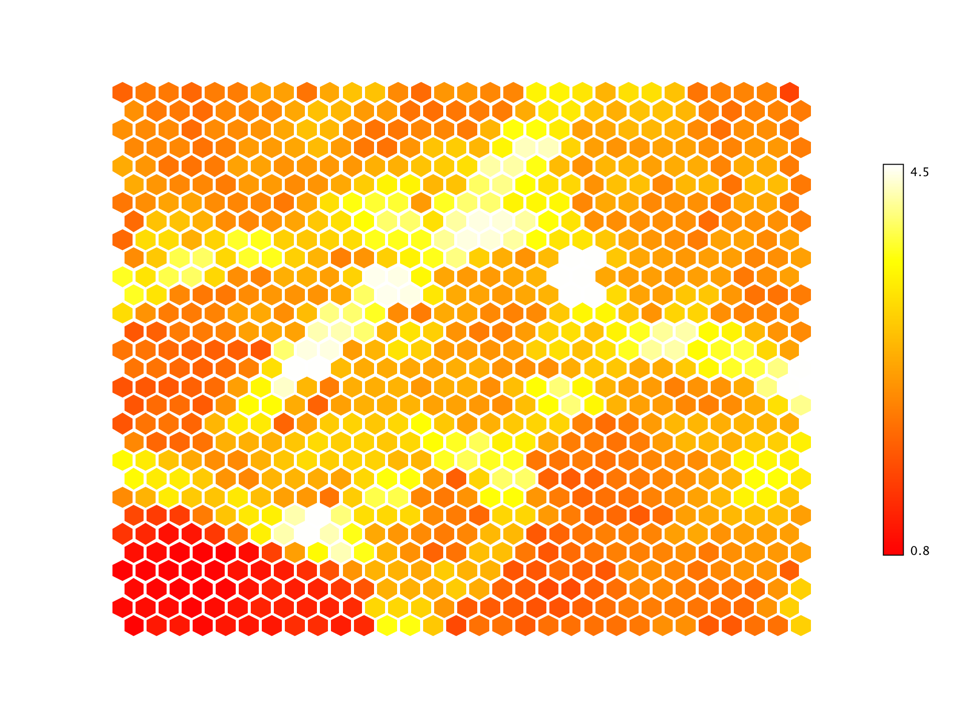
In machine learning, the hex map is often used to visualize self-organized map (SOM). An SOM is a type of artificial neural network that is trained using unsupervised learning to produce a low-dimensional (typically two-dimensional), discretized representation of the input space of the training samples. An SOM consists of components called nodes or neurons. Associated with each node are a weight vector of the same dimension as the input data vectors, and a position in the map space. The U-Matrix value of a particular node is the average distance between the node's weight vector and that of its closest neighbors. In practice, researchers often use the hex map to visualize the U-Matrix.
In the following example, we train and visualize a SOM on the USPS training data set with 30 x 30
nodes.
    import org.apache.commons.csv.CSVFormat;
    import smile.vq.SOM;
    import smile.io.Read;
    import smile.math.MathEx;
    import smile.plot.swing.Hexmap;
    import smile.plot.swing.Palette;
    import smile.util.function.TimeFunction;
    import smile.vq.Neighborhood;

    var zip = Read.csv("data/usps/zip.train", CSVFormat.Builder.create().setDelimiter(' ').get());
    var x = zip.drop(0).toArray();
    var lattice = SOM.lattice(30, 30, x);
    var som = new SOM(lattice,
                TimeFunction.constant(0.1),
                Neighborhood.Gaussian(1, x.length * 10 / 4));

    for (int i = 0; i < 10; i++) {
        for (int j : MathEx.permutate(x.length)) {
            som.update(x[j]);
        }
    }

    var figure = Hexmap.of(som.umatrix(), Palette.heat(256)).figure();
    figure.show();
    import smile.util.function._
    val zip = read.csv("data/usps/zip.train", delimiter = " ", header = false)
    val x = zip.drop(0).toArray()
    val lattice = SOM.lattice(30, 30, x)
    val som = new SOM(lattice,
                TimeFunction.constant(0.1),
                Neighborhood.Gaussian(1, x.length * 10 / 4))

    for (i <- 0 until 10) {
        MathEx.permutate(x.length).foreach { j =>
            som.update(x(j))
        }
    }

    show(hexmap(som.umatrix, Palette.heat(256)))
In the hex map, areas of low neighbour distance indicate groups of nodes that are similar. Areas with large distances indicate the nodes are much more dissimilar, and indicate natural boundaries between node clusters.
Contour
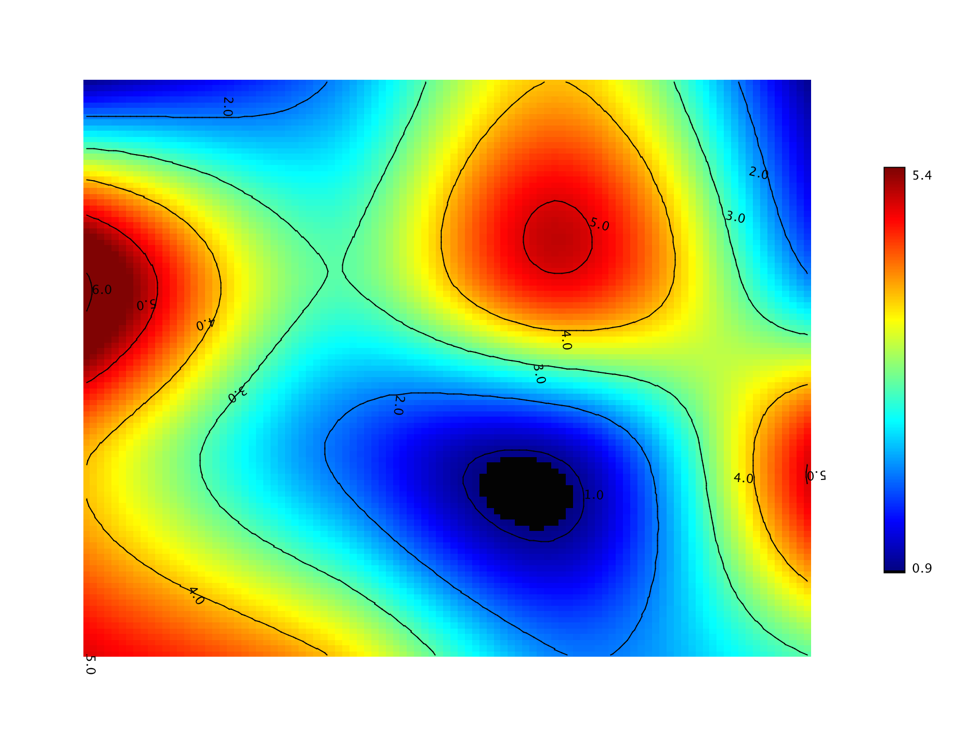
A contour plot represents a 3-dimensional surface by plotting constant z slices, called contours,
on a 2-dimensional format. That is, given a value for z, lines are drawn for connecting the
(x, y) coordinates where that z value occurs.
Use Contour (Scala: contour).
Optional ascending x/y locate matrix cells. In Java,
Contour.of(z, numLevels) chooses evenly spaced levels; Scala also accepts an
explicit levels array via contour(z, levels).
Contours are often layered on a heat map. The following adds contour lines to the previous heat map example.
    import smile.plot.swing.Contour;
    import smile.plot.swing.Heatmap;

    var figure = Heatmap.of(Z, 256).figure();
    figure.add(Contour.of(Z));
    figure.show();
    val canvas = heatmap(Z, Palette.jet(256))
    canvas.figure().add(Contour.of(Z))
    show(canvas)
This shows how to compose plots: build a figure from one plot, then
figure.add(...) additional shapes such as contours.
Surface
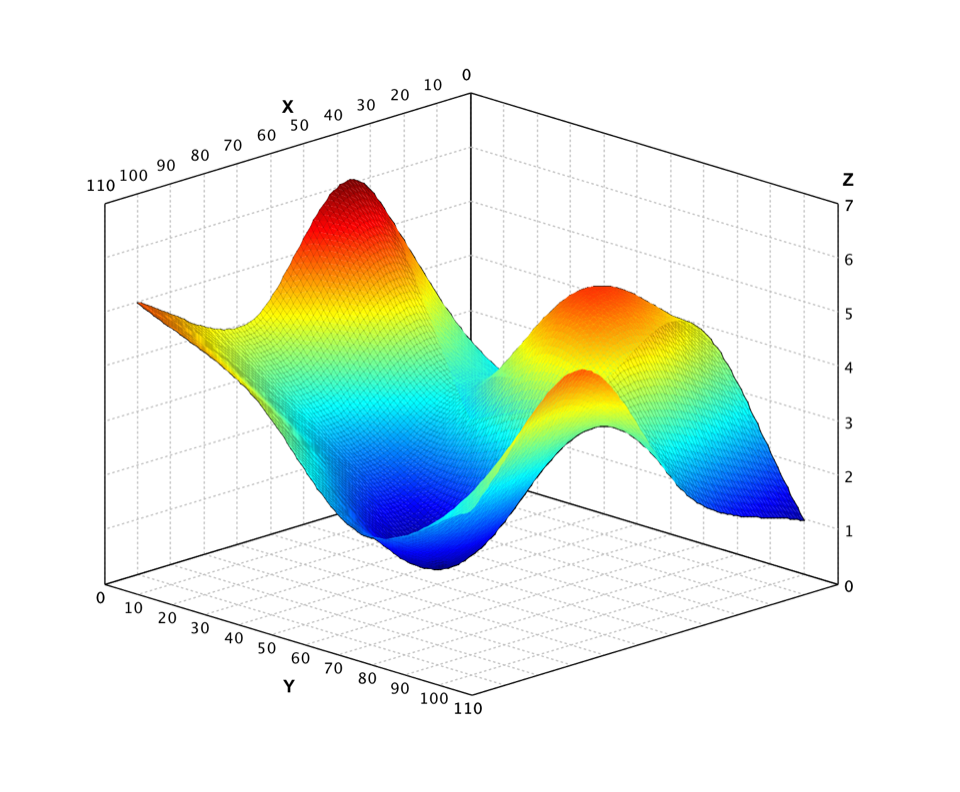
Besides heat map and contour, we can also visualize a matrix with the three-dimensional shaded surface.
Use Surface (Scala: surface)
with a color palette (as below) or a color count k. Optional x/y
locate the surface samples. There is no single-argument Surface.of(z).
    import smile.plot.swing.Palette;
    import smile.plot.swing.Surface;

    var figure = Surface.of(Z, Palette.jet(256, 1.0f)).figure();
    figure.show();
show(surface(Z, Palette.jet(256, 1.0f)))
The surface of same example data is shown as
Wireframe
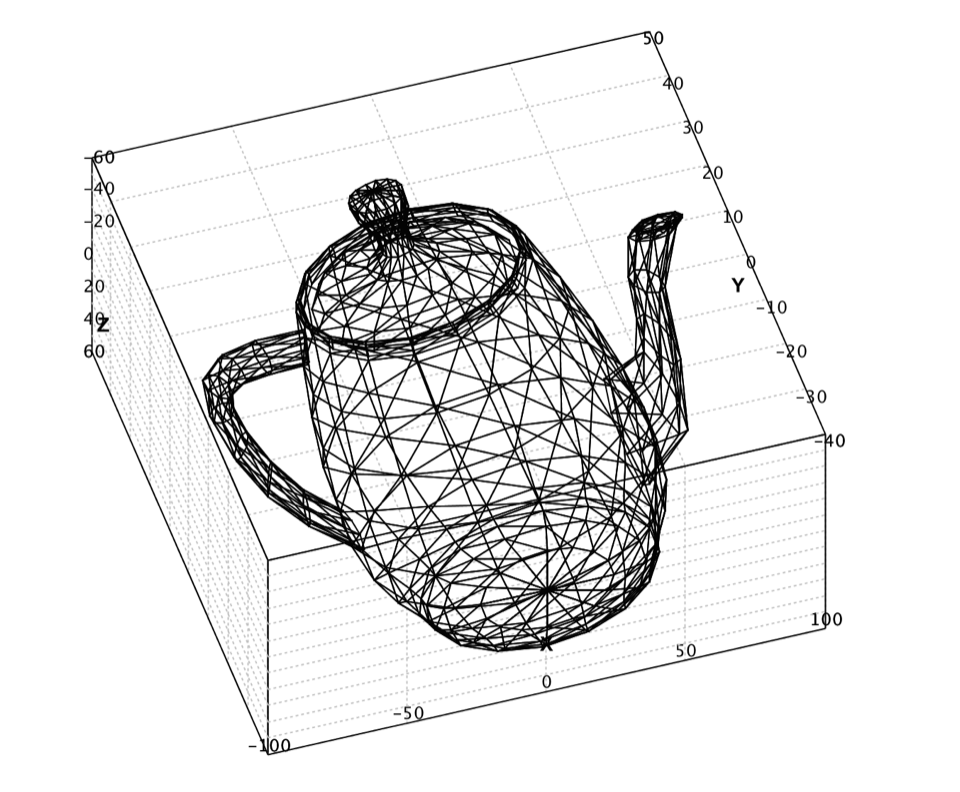
A wireframe presents a 3D object with a vertex table and an edge table. Each vertex stores coordinates; each edge references two vertices.
Use Wireframe
(Wireframe.of(vertices, edges)) with vertex and edge tables.
In Scala, read.wavefront loads Wavefront OBJ files into those tables.
vertices is an n × 2 or n × 3 coordinate array;
edges is an m × 2 array of vertex index pairs.
    val (vertices, edges) = read.wavefront("data/wavefront/teapot.obj")
    show(wireframe(vertices, edges))
The above code draws the wireframe of a teapot.